Note
Go to the end to download the full example code.
Reclaiming whitespace after removing axes and groups
Neither remove() nor
remove_group() reflows the grid on their
own: the row/column a removed axes used to occupy stays reserved (nothing
else in the figure knows it’s gone), and a group emptied by removing its
axes directly freezes its box in its last position rather than
disappearing. tight_layout()’s
collapse="grid" reclaims both – shrinking any row/column that’s now
entirely empty, and dropping any group left with zero members – without
ever moving a surviving axes relative to its siblings (a single gap inside
an otherwise-populated row/column is left alone; that needs the
not-yet-built collapse="tight").
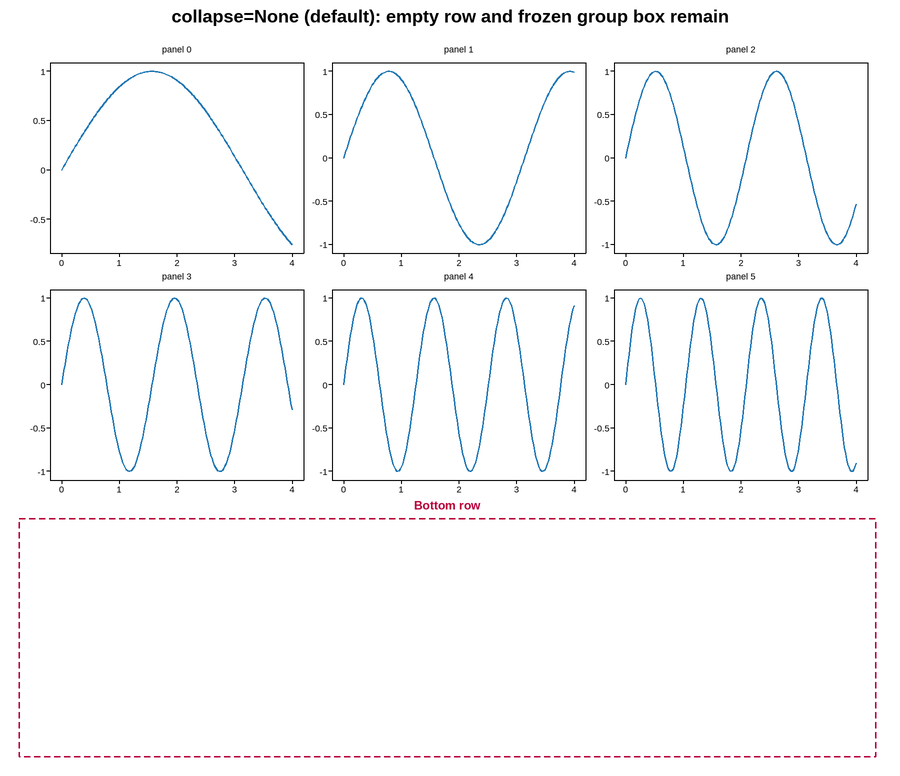
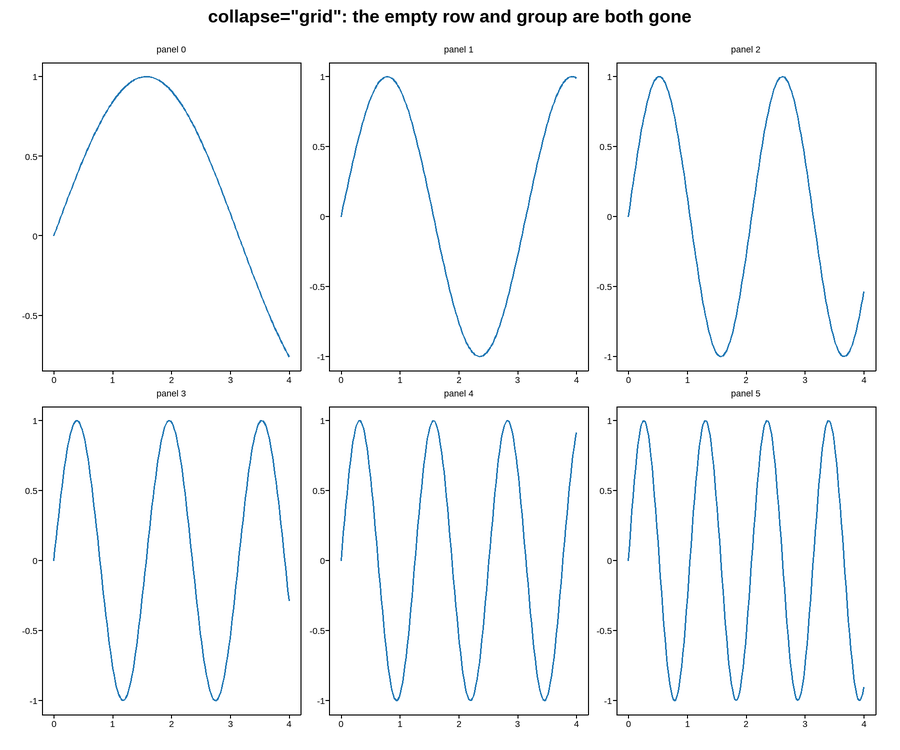
Live figure — pick a tool, then zoom, pan, point-pick or annotate. Nothing is active until a tool is selected.
View this figure’s Vega export ↗ — the raw JSON spec, rendered live by a real Vega engine.
View this figure’s Vega-Lite export ↗ — the raw JSON spec(s), rendered live by a real Vega-Lite engine.
Live figure — pick a tool, then zoom, pan, point-pick or annotate. Nothing is active until a tool is selected.
View this figure’s Vega export ↗ — the raw JSON spec, rendered live by a real Vega engine.
View this figure’s Vega-Lite export ↗ — the raw JSON spec(s), rendered live by a real Vega-Lite engine.
groups before collapse: ['Bottom row']
groups after collapse: []
import numpy as np
import plotpress

t = np.linspace(0, 4, 200)


def _build_and_empty_bottom_row():
    """A 3x3 grid with a group across the bottom row, then that entire row
    removed directly (not via remove_group()) -- emptying "Bottom row" as
    a side effect, which freezes its box rather than dropping it."""
    fig, axes = plotpress.subplots(3, 3, figsize=(9, 7.5))
    for i, ax in enumerate(axes.ravel()):
        ax.plot(t, np.sin(t * (i + 1)))
        ax.set_title(f"panel {i}", fontsize=9)
    fig.group("Bottom row", list(axes[2, :]), color="#b8003a")
    for ax in list(axes[2, :]):
        ax.remove()
    return fig


# ---------------------------------------------------------------------------
# Without collapse: the grid still lays out 3 rows -- an empty one at the
# bottom -- and "Bottom row"'s box stays frozen with nothing left inside it.
# ---------------------------------------------------------------------------
fig_uncollapsed = _build_and_empty_bottom_row()
fig_uncollapsed.tight_layout()
fig_uncollapsed.suptitle('collapse=None (default): empty row and frozen group box remain')

# ---------------------------------------------------------------------------
# collapse="grid" shrinks the now-fully-empty bottom row away and drops the
# group that had nothing left in it, reclaiming both.
# ---------------------------------------------------------------------------
fig_collapsed = _build_and_empty_bottom_row()
print("groups before collapse:", [g.title for g in fig_collapsed.get_groups()])
fig_collapsed.tight_layout(collapse="grid")
print("groups after collapse:", [g.title for g in fig_collapsed.get_groups()])
fig_collapsed.suptitle('collapse="grid": the empty row and group are both gone')
Total running time of the script: (0 minutes 0.315 seconds)