Note
Go to the end to download the full example code.
Slice: read a row of a heatmap as a line
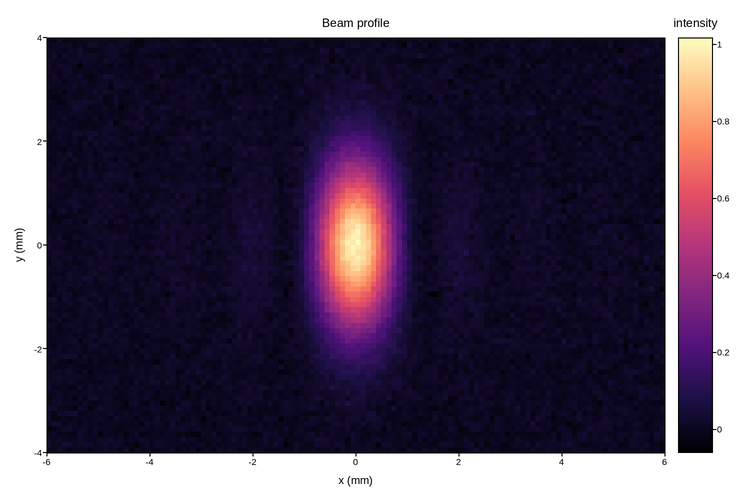
A heatmap shows the whole field at once but is a poor way to read a value off
it. The interactive Slice tool (options=["slice"]) pairs it with a
profile: a strip beside the heatmap plots one row of the field as a line, and a
slider scrubs that row up and down the grid. Both stay aligned to the heatmap’s
own axis, so a peak in the strip sits directly above the bright column it comes
from.
Here the field is a beam profile with diffraction fringes. Scrub the slider (or press play): near the centre the strip is a tall central peak with side lobes; toward the edge it flattens to noise. Turn on Point Picking and click the strip to read a sample’s exact coordinate and value; the tool’s menu switches the slice to columns (Slice Y) and the profile to other views.
The slider is part of the live figure below, not the static image above. Slice is off until enabled, so this example asks for it on at load with a starting row:
fig.save("beam.html", interactive=True,
         options={"slice": {"enabled": True, "index": 30}})
Live figure — pick a tool, then zoom, pan, point-pick or annotate. Nothing is active until a tool is selected.
View this figure’s Vega export ↗ — the raw JSON spec, rendered live by a real Vega engine.
View this figure’s Vega-Lite export ↗ — the raw JSON spec(s), rendered live by a real Vega-Lite engine.
import numpy as np
import plotpress

x = np.linspace(-6, 6, 121)
y = np.linspace(-4, 4, 81)
X, Y = np.meshgrid((x[:-1] + x[1:]) / 2, (y[:-1] + y[1:]) / 2)
rng = np.random.default_rng(4)
beam = np.exp(-(Y / 1.6) ** 2) * np.sinc(X / 1.4) ** 2 + 0.015 * rng.normal(size=X.shape)

fig, ax = plotpress.subplots(figsize=(7.5, 5))
mesh = ax.pcolormesh(x, y, beam, cmap="magma")
ax.set_xlabel("x (mm)")
ax.set_ylabel("y (mm)")
ax.set_title("Beam profile")
fig.colorbar(mesh, ax=ax, label="intensity")
fig.tight_layout()

_gallery_interactive_options = {"slice": {"enabled": True, "index": 30}}
Total running time of the script: (0 minutes 0.141 seconds)