Note
Go to the end to download the full example code.
Non-uniform meshes: vector cells by default, and when raster comes back
pcolormesh and imshow are the same call on a uniform grid: both
rasterize the field to one embedded <image>, and given evenly spaced
coordinates they emit byte-identical rasters at identical placement. The
difference is what they accept. imshow takes an extent and is uniform by
construction; pcolormesh takes coordinates and honors whatever spacing they
describe.
A non-uniform grid used to always pay for that by rasterizing: one image stretched linearly across the extent, resampled by assigning each output pixel the cell its center falls inside. Equal-width pixels cannot represent unequal cells exactly, and past a point a cell thinner than one output pixel simply isn’t drawn at all.
pcolormesh(..., rasterized=None) (the default) no longer pays that cost
when it doesn’t have to: under about 2000 cells, a non-uniform grid now draws
as exact vector <rect> elements instead, one per cell, positioned at the
cell’s own true edges. There is no raster grid for a thin cell to fall
between, so every cell survives no matter how extreme the width ratio gets.
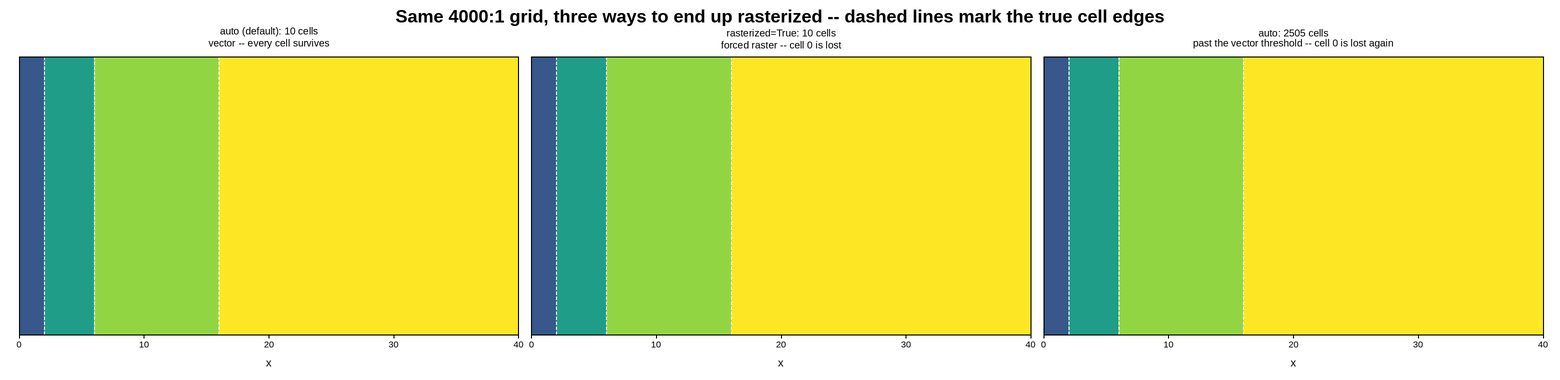
The three panels below share the same 4000:1 grid – one cell is 1/4000th of the span – and show the three ways it can still end up rasterized: never (the default), forced, and outgrown. The last two both warn, naming the cell they drop; the warnings are caught and printed below rather than left to a build log so the message is where the picture is.
Live figure — pick a tool, then zoom, pan, point-pick or annotate. Nothing is active until a tool is selected.
View this figure’s Vega export ↗ — the raw JSON spec, rendered live by a real Vega engine.
View this figure’s Vega-Lite export ↗ — the raw JSON spec(s), rendered live by a real Vega-Lite engine.
UserWarning: pcolormesh(): cell 0 (x=0..0.01) narrower than one output pixel and will not appear in the raster. Pass rasterized=False to draw exact vector cells instead (cheap here, under ~2000 cells), or use a log scale if this axis spans decades.
UserWarning: pcolormesh(): cell 0 (x=0..0.01) narrower than one output pixel and will not appear in the raster. This mesh has 2505 cells, past the ~2000-cell auto threshold, so rasterized=False will draw every cell exactly but produce a much larger SVG (see pcolormesh_vector_cell_limit.py) -- or use a log scale if this axis spans decades.
import warnings

import numpy as np
import plotpress

EDGES = np.array([0.0, 0.01, 2.0, 6.0, 16.0, 40.0])
Y_EDGES = np.array([0.0, 0.5, 1.0])
FIELD = np.tile(np.arange(5.0), (2, 1))

# Panel 3 keeps the exact same x-ratio but adds enough rows to push the cell
# count (5 cells x 501 rows = 2505) past the auto-mode vector threshold, so
# it falls back to raster the same way rasterized=True forces in panel 2 --
# without anyone passing rasterized at all.
Y_EDGES_MANY = np.linspace(0.0, 1.0, 502)
FIELD_MANY = np.tile(np.arange(5.0), (501, 1))

fig, axes = plotpress.subplots(1, 3, figsize=(15.6, 3.8))

axes[0].pcolormesh(EDGES, Y_EDGES, FIELD, cmap="viridis", vmin=0.0, vmax=4.0)
axes[0].set_title("auto (default): 10 cells\nvector -- every cell survives", fontsize=10)

with warnings.catch_warnings(record=True) as caught:
    warnings.simplefilter("always")
    axes[1].pcolormesh(EDGES, Y_EDGES, FIELD, cmap="viridis", vmin=0.0, vmax=4.0,
                       rasterized=True)
    axes[1].set_title("rasterized=True: 10 cells\nforced raster -- cell 0 is lost",
                      fontsize=10)

    axes[2].pcolormesh(EDGES, Y_EDGES_MANY, FIELD_MANY, cmap="viridis",
                       vmin=0.0, vmax=4.0)
    axes[2].set_title("auto: 2505 cells\npast the vector threshold -- cell 0 is lost again",
                      fontsize=10)

for ax in axes:
    for e in EDGES[1:-1]:
        ax.axvline(e, color="#ffffff", linestyle="--", linewidth=1.2)
    ax.set_xlim(EDGES[0], EDGES[-1])
    ax.set_ylim(0.0, 1.0)
    ax.set_yticks([])
    ax.set_xlabel("x")

fig.suptitle("Same 4000:1 grid, three ways to end up rasterized -- dashed lines mark the true cell edges")
fig.tight_layout()

for w in caught:
    print(f"{w.category.__name__}: {w.message}")
Total running time of the script: (0 minutes 0.279 seconds)