Note
Go to the end to download the full example code.
Customizing the polar frame
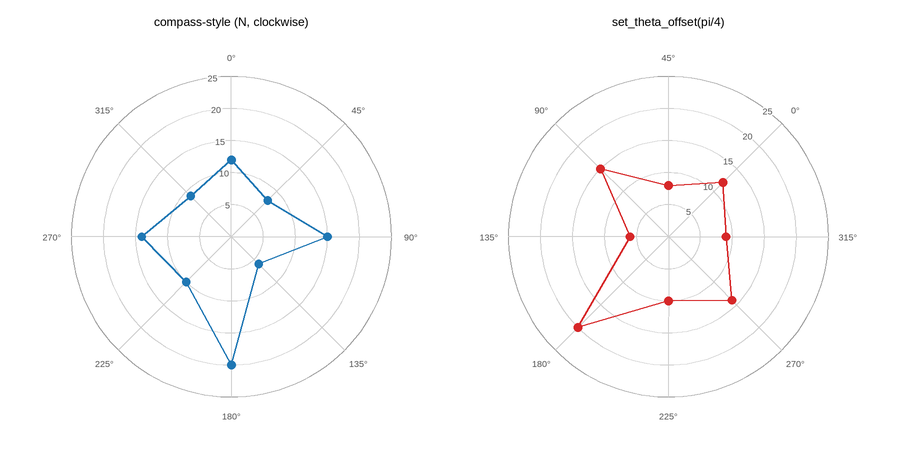
Radial limits/ticks (set_rlim/set_rticks), angular gridlines
(set_thetagrids), and orientation – a compass-style
set_theta_zero_location/set_theta_direction on the left, the
lower-level set_theta_offset (a raw angle in radians) on the right.
All three orientation calls have to run before any data is plotted –
changing them afterward would need re-projecting every artist already
drawn.
Live figure — pick a tool, then zoom, pan, point-pick or annotate. Nothing is active until a tool is selected.
View this figure’s Vega export ↗ — the raw JSON spec, rendered live by a real Vega engine.
View this figure’s Vega-Lite export ↗ — the raw JSON spec(s), rendered live by a real Vega-Lite engine.
import numpy as np
import plotpress

bearings = np.radians([0, 45, 90, 135, 180, 225, 270, 315])
speed = np.array([12, 8, 15, 6, 20, 10, 14, 9])
loop = np.append(bearings, bearings[0]), np.append(speed, speed[0])

fig, (ax1, ax2) = plotpress.subplots(1, 2, figsize=(9, 4.5), projection="polar")

ax1.set_theta_zero_location("N")   # 0 degrees points up, like a compass
ax1.set_theta_direction(-1)        # clockwise, like a compass bearing
ax1.set_thetagrids([0, 45, 90, 135, 180, 225, 270, 315])
ax1.plot(*loop, color="#1f77b4")
ax1.scatter(*loop, color="#1f77b4")
ax1.set_rlim(0, 25)
ax1.set_rticks([5, 10, 15, 20, 25])
ax1.set_title("compass-style (N, clockwise)")

ax2.set_theta_offset(np.pi / 4)    # theta=0 drawn 45 degrees round instead
ax2.plot(*loop, color="#d62728")
ax2.scatter(*loop, color="#d62728")
ax2.set_rlim(0, 25)
ax2.set_rticks([5, 10, 15, 20, 25])
ax2.set_title("set_theta_offset(pi/4)")

fig.tight_layout()
Total running time of the script: (0 minutes 0.120 seconds)